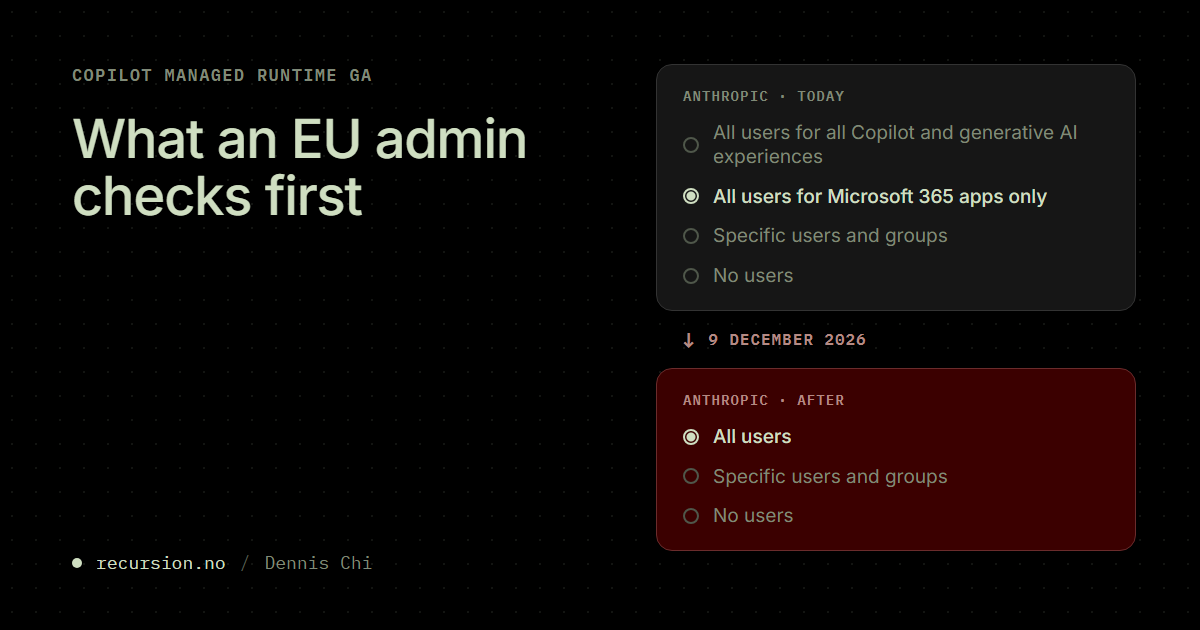
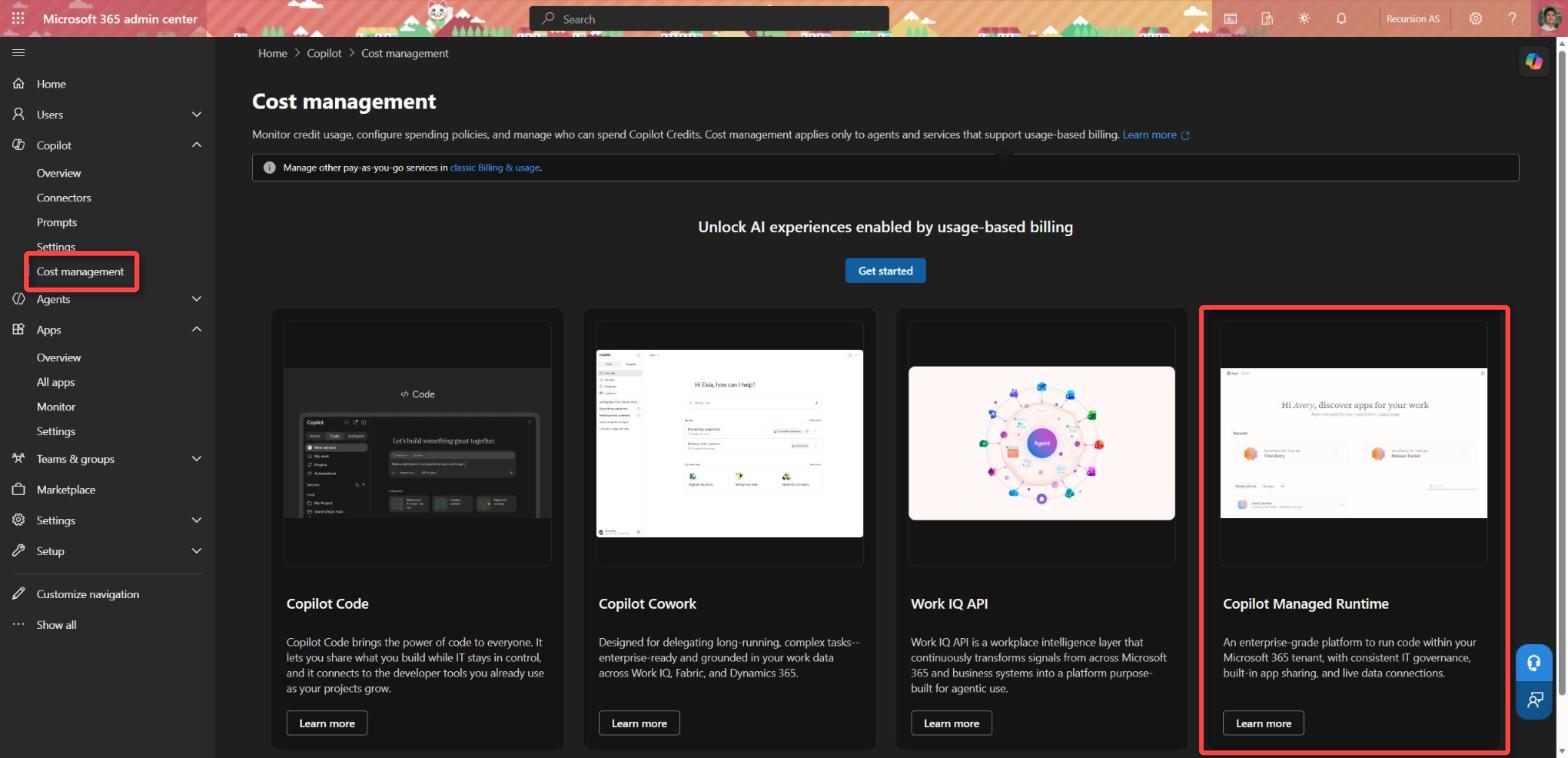
Microsoft announced at Ignite on 17 November that Copilot Managed Runtime is generally available. It is also called Managed Apps, and it is beginning to roll out to tenants. The announcement says nothing about the EU Data Boundary, regions or licensing.
An EU customer can still build inside the boundary today. Cowork in an EU tenant builds with GPT only, and GPT runs inside the boundary. Copilot Code and the ms CLI let you pick the model. What is left is admin work. Three settings decide whether the AI that builds the app stays inside:
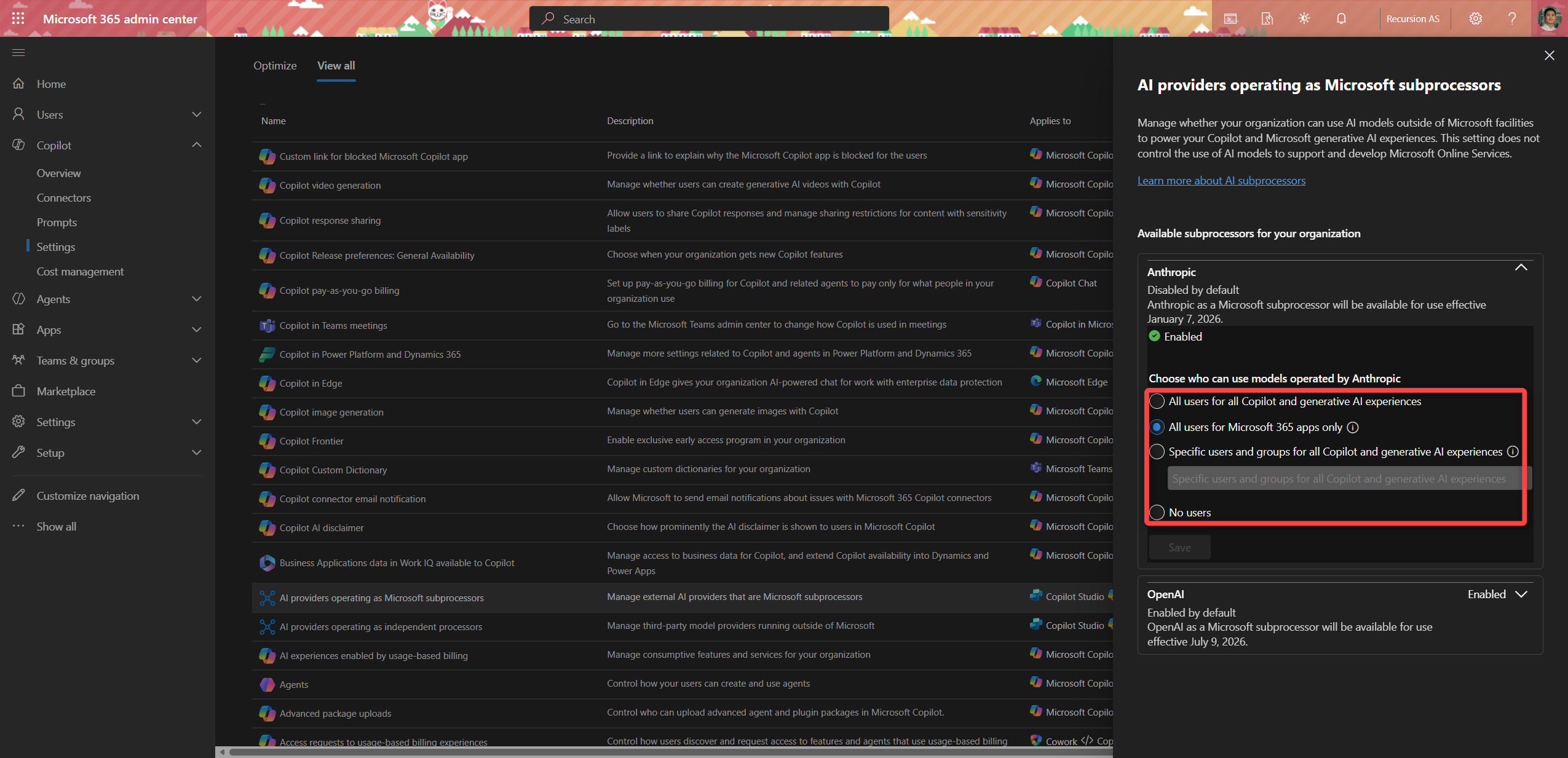
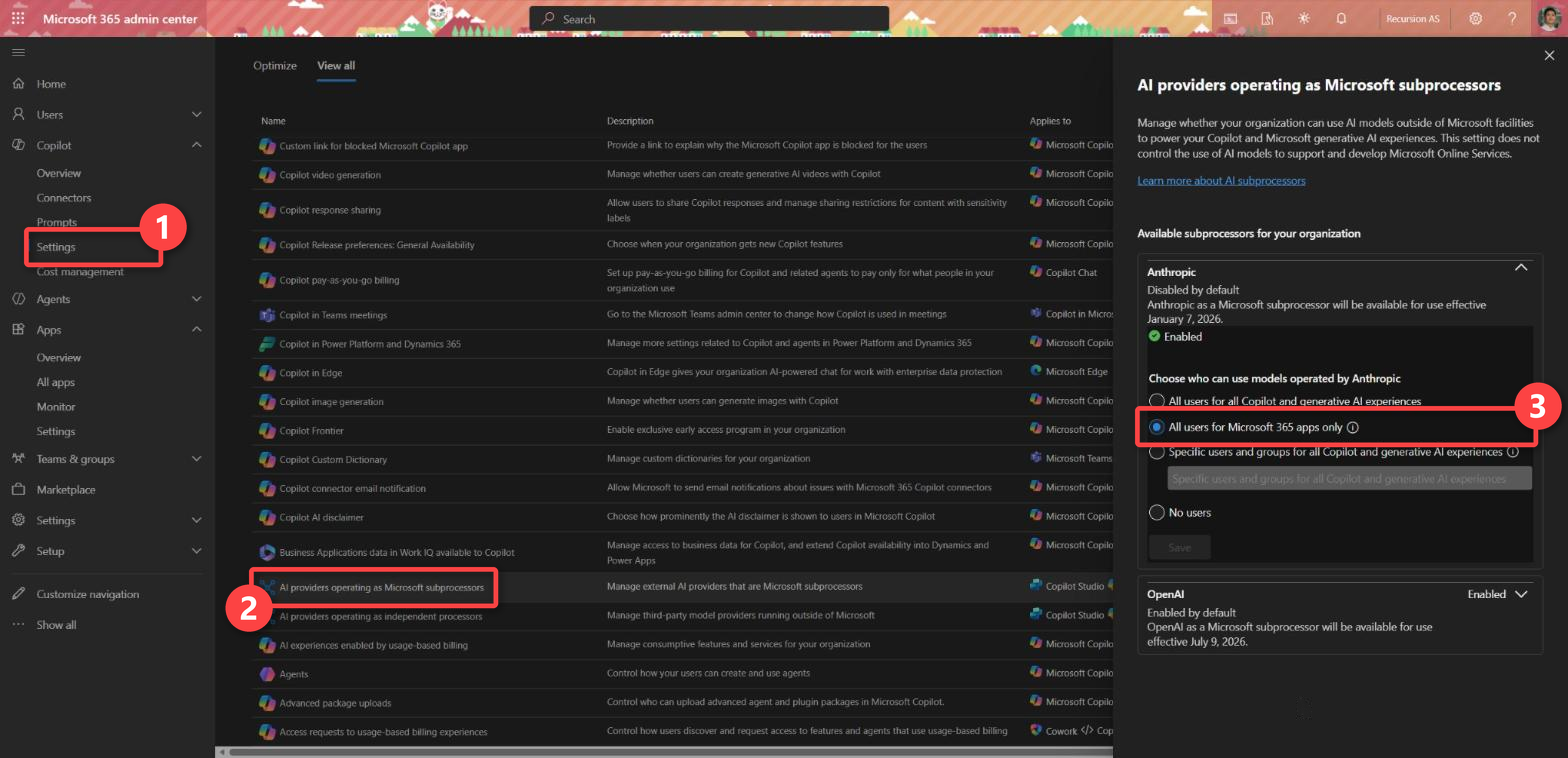
- The Anthropic setting. Claude is off by default in an EU or EFTA tenant. An admin controls it under Copilot > Settings > AI providers operating as Microsoft subprocessors. That default changes on 9 December. The setting scopes to users and groups, not to environment groups.
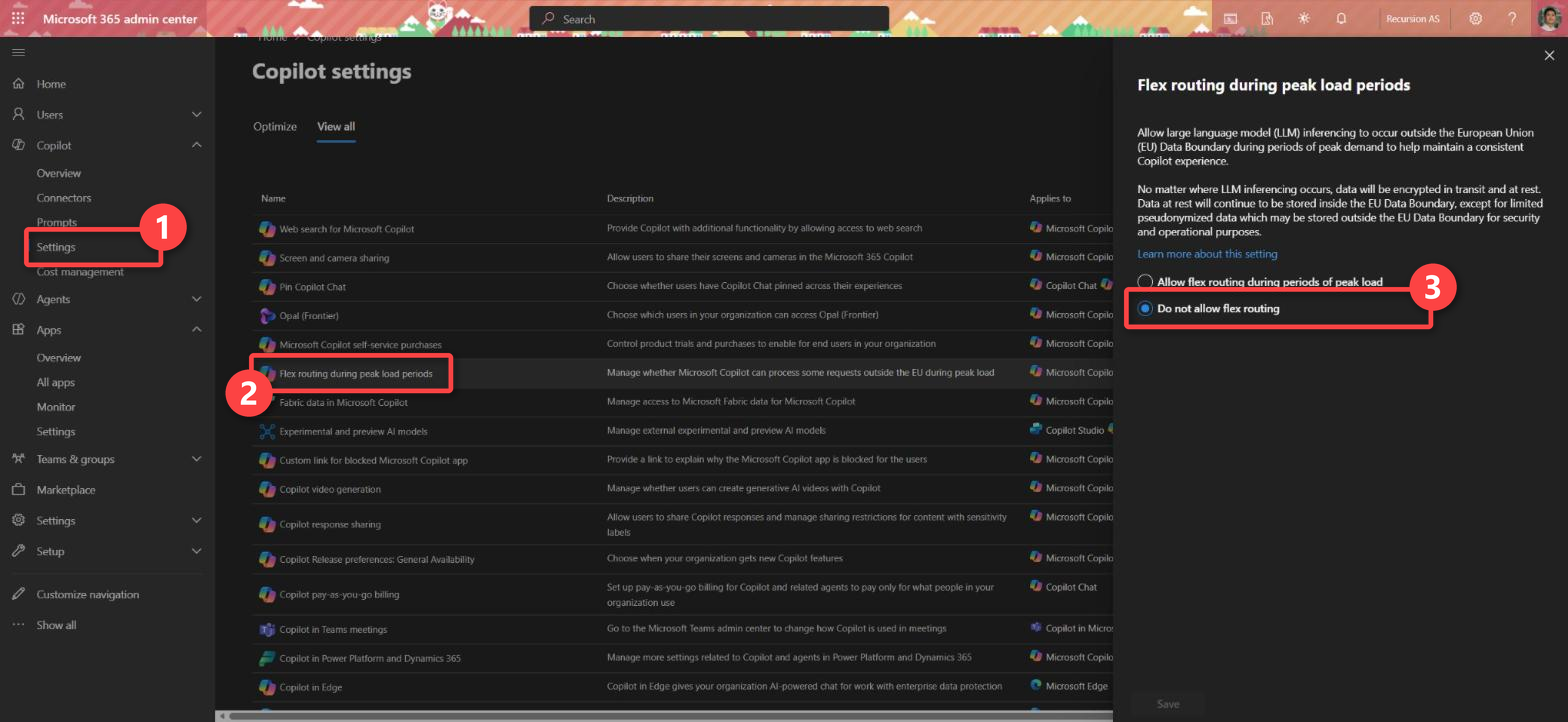
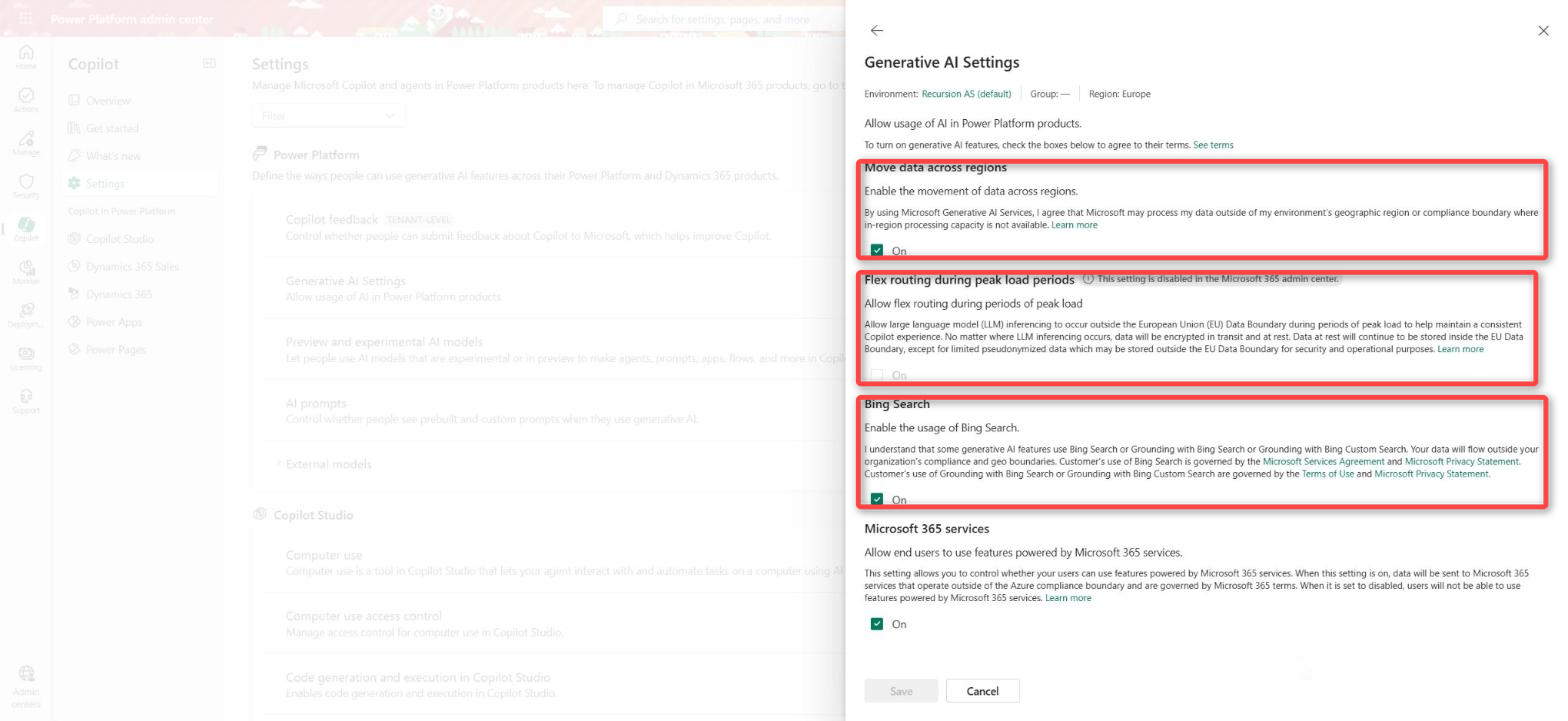
- Flex routing. It must be off in both the Microsoft 365 admin center and the Power Platform admin center. Otherwise prompts can be processed in the United States, Canada or Australia at peak load. Flex routing is on by default for tenants created after 25 March 2026.
- The geography, for Copilot Studio. Every environment must be in the EU and EFTA geography, and every maker’s Entra profile must point to an EU or EFTA country… Confusing?… More on that down below…
Microsoft does not say which model Copilot Studio uses when it builds an app. The new Fabric backend adds a different risk. Its data is shared with everyone the app is shared with.
I like what Copilot Managed Runtime is, and an EU customer can start with it once an admin has checked those three settings.
What GA gives you
Microsoft runs the platform and handles hosting, scaling and uptime. A developer has no cloud services to set up. Users sign in with Entra and the maker shares the app through Entra. Governed connections give the app access to organisational data “within the boundaries set by IT”.
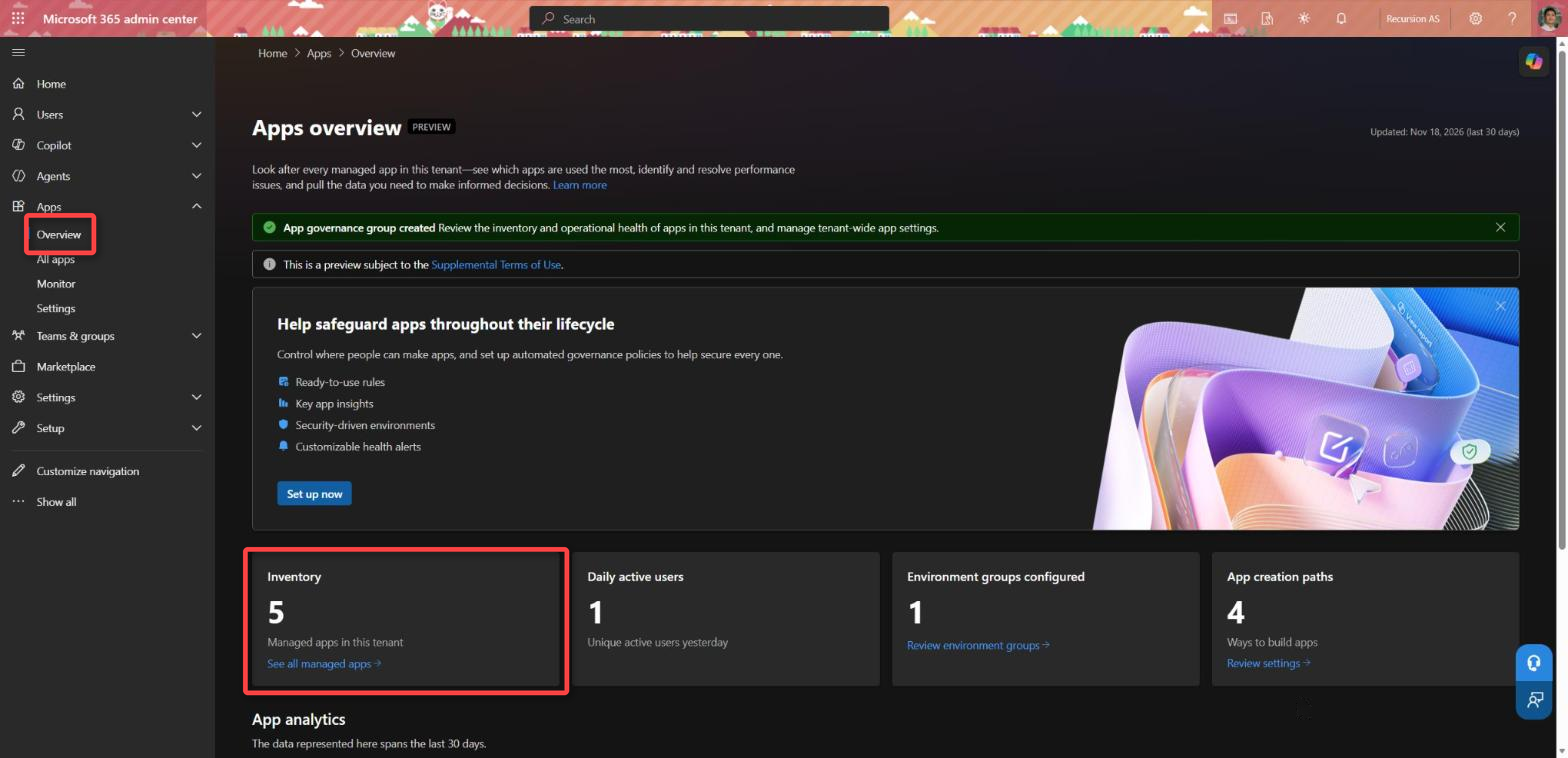
The code is Git-backed and stays editable. A published app stays live while the maker keeps working on it. A GitHub Enterprise organisation can connect its own repositories. In the Microsoft 365 admin center (MAC), an admin gets the app inventory, monitoring and audit logging. The admin also sets policies for connector, data and endpoint access.
The repo on the platform is still the gain over Code Apps for me. A maker in Copilot Studio, a business user in Cowork and a developer with the ms CLI all end up with code in Git. Someone can review that code. A Code App has no repo on the platform.
Still in preview
Microsoft announced new previews together with GA:
- Microsoft Fabric integration is a frontier public preview. It gives a managed app persistent storage for business records.
- Local development of Copilot Studio agents and workflows is a public preview. A developer publishes them through the msagent CLI. Microsoft says the CLI is “not meant for production use”. Running agents and evaluations still uses cloud services.
- Code Agents are agents authored in code and hosted on Copilot Managed Runtime. They are an early-access preview that is “coming soon”.
Claude is also not the only brake. A company with a low appetite for preview terms will keep the Fabric backend and the msagent CLI out of production. That does not change in December.
The Fabric backend (public preview)
In September, the Managed App team announced that new ways to integrate data in the app are gradually being introduced.
The Fabric integration is the first public answer, and it is a different product. An app has no database by default. An admin turns the integration on for the environment group first. A developer then adds it with ms app add backend --provider fabric and writes the tables in TypeScript. The tables live in a rayfin folder and are written with the Rayfin SDK, which Fabric Apps is built on. Copilot Managed Runtime still hosts and governs the app. Fabric Apps provides the database, which is a SQL database in Fabric. Microsoft calls database “currently the only backend capability”.
The backend needs two meters. One is a Fabric license (Power BI Premium Per User, Power BI Pro or Fabric Free). The other is Copilot Credits usage-based billing for the compute the database uses.
Microsoft’s Copilot Credits Guide from November puts a rate on the credits: 0.005 credits per second of Fabric compute, adjusted for region and workload. No Fabric capacity has to be bought. The guide estimates 250 to 550 credits a month for a small team app. That is about ten times what the guide estimates for running the same small app with connectors. For a department app the difference is about four to five times. If the data is already in SharePoint or Dataverse, a connector costs fewer credits.
The sharing rule is the one I would put in front of a data protection officer. Microsoft says: “When you share apps through Copilot Managed Runtime, you automatically share the data stored in Fabric Apps with the same users.” I have written before that sharing a managed app does not grant access to the data. For connectors and Dataverse that is still the case. Each user needs permissions and a connection to the data. For the Fabric store, app access is data access.
An admin keeps the backend off per environment group in MAC. The rule is called Allow Backend as a Service (Fabric) for Copilot Managed Runtime.
What the announcement leaves out
Pricing
Microsoft has published the rate. Copilot Managed Runtime costs 0.1 Copilot Credits per API call. Each static file the app loads at launch counts as one call. So does each connector call, each Dataverse call and each publish. US$1 buys 100 credits. That is about 1,000 calls, or “typically several hundred app launches”.
Say a team app loads three files at launch and makes two connector calls. That is five calls, or half a credit per launch. Microsoft suggests 100 credits per user per month as a start. That covers about 200 launches.
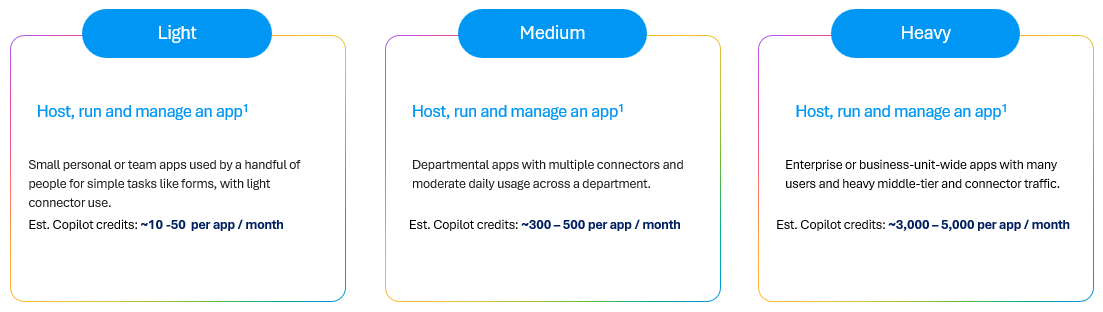
The Copilot Credits Guide also estimates the cost per app. A small team app with light connector use comes to about 10 to 50 credits a month, or 10 to 50 cents. A department app with several connectors comes to 300 to 500 credits. An app for a whole business unit, with heavy middle-tier and connector traffic, comes to 3,000 to 5,000 credits, or US$30 to 50. The estimates leave out the request limits that come with Power Apps Premium.
Building the app costs more. The same guide estimates 250 to 1,350 credits or more to build one app in Cowork or Copilot Studio, depending on the model and on how many rounds the maker needs.
The licensing rules have changed since my earlier posts:
- A user who runs an app needs Power Apps Premium. The alternative is a place in a spending policy for the Copilot Managed Runtime service. That includes a developer who runs the app locally with the CLI.
- A user can have both. Premium is used first. Credits pay for what Premium does not cover, such as Work IQ APIs and usage above the Power Platform request limits.
- Power Apps use rights in Microsoft 365 E3/E5 and Dynamics 365 do not cover it. A Microsoft 365 Copilot license on its own does not cover the runtime either.
- Creating, building and deploying with the CLI needs no license.
- A user with too few credits gets a warning first. Microsoft blocks the app after 20 app operations or five minutes.
In September I wrote that the credit pricing decides whether Copilot Managed Runtime becomes the default for internal apps. I can answer half of that now. US$1 per user per month as a start is a number a customer can plan with. The other half is the admin work in this post.
Your own repos
A developer chooses the repo type when the app is created and cannot change it later. The default is the Git repo on the platform. The other option is a GitHub repo owned by an organisation on GitHub Enterprise Cloud (github.com or *.ghe.com). GitHub Enterprise Server, personal accounts and Azure DevOps are not supported.
A customer on Azure DevOps has one documented workaround: external artifact deployment (--repo none with GitHub Actions). It is off by default. The repo type is fixed, so the customer has to decide before the first app is created.
The host and the EU Data Boundary
I found no statement in Microsoft’s documentation that the Copilot Managed Runtime host is an EU Data Boundary service (searched 17 November). The quickstart says Entra, Conditional Access and data loss prevention (DLP) policies govern the app. It says nothing about where the app runs.
Some customers held back on the preview because of Claude. I still read that objection as right for the AI build paths and not for the CLI. I expected GA to settle the host question. The announcement did not.
The December deadline
Microsoft says Claude models “are coming into the EU Data Boundary starting in December 2026”. Until then it lists Claude models in Microsoft Copilot, Copilot Studio and Power Platform as “currently excluded from the EU Data Boundary”. They are off by default for EU, EFTA and UK tenants.
On 9 December Microsoft simplifies the Anthropic subprocessor setting. Some tenants have not made a selection. Others chose “All users for Microsoft 365 apps only”. Both are moved to All users. A tenant that chose “No users” keeps it. Off by default is not off, the same lesson as the maker control in October. An admin who wants Claude off has to select No users before 9 December. Microsoft does not say whether Claude is inside the boundary on that date.
Scoping Anthropic to an environment group
A question I got recently: can the Anthropic setting in the Microsoft 365 admin center be scoped to an environment group? No. There are two separate settings, and Claude must be allowed in both before a maker can use it in Copilot Studio or Power Platform.
- Microsoft 365 admin center. An AI Administrator scopes Anthropic to all users, no users, or specific users and Entra security groups (up to 999 assignments). It applies to the provider, not to a single model, and Microsoft enforces it across Copilot, Copilot Studio and the Power Platform admin center. It has no environment scope.
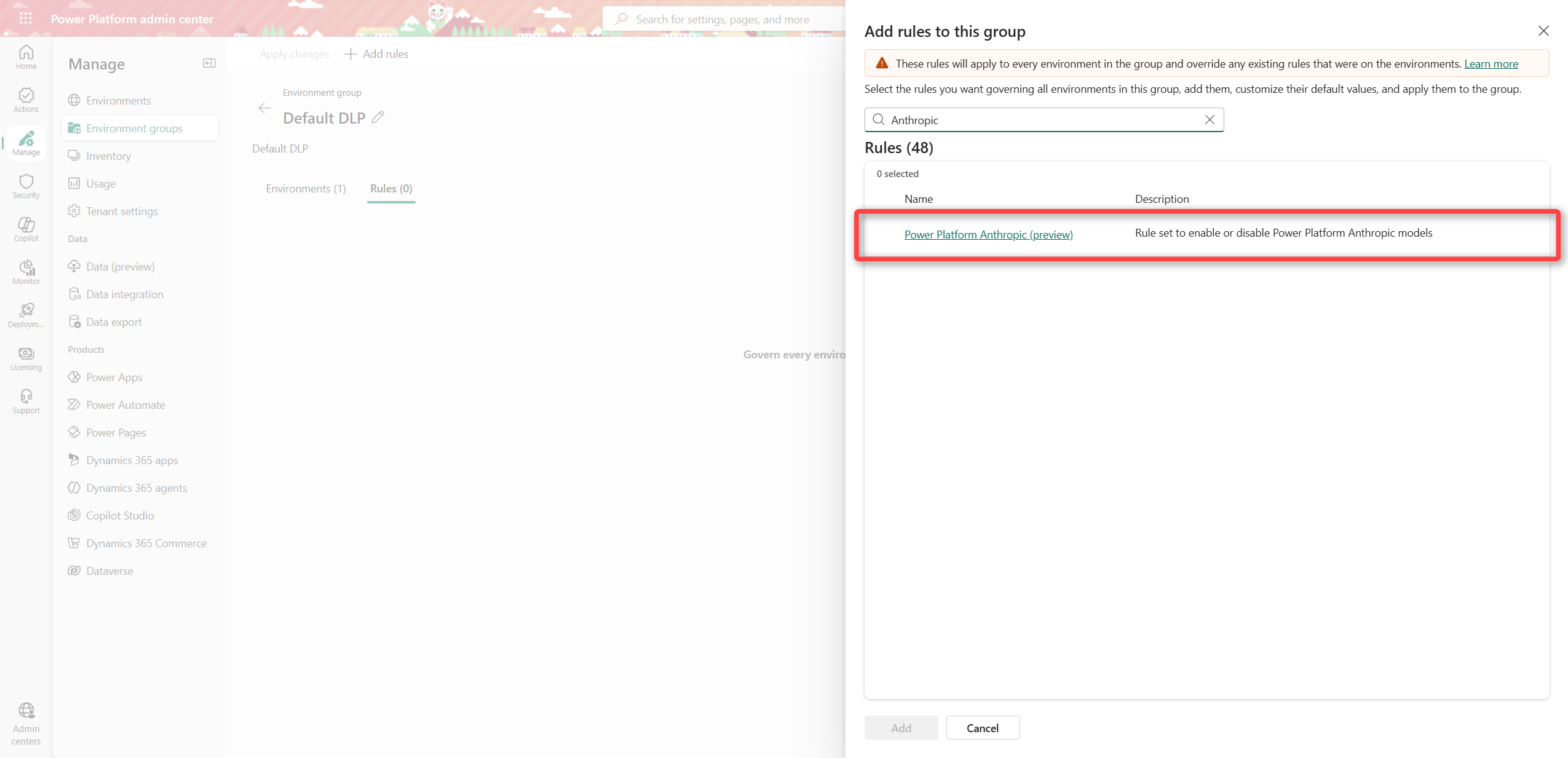
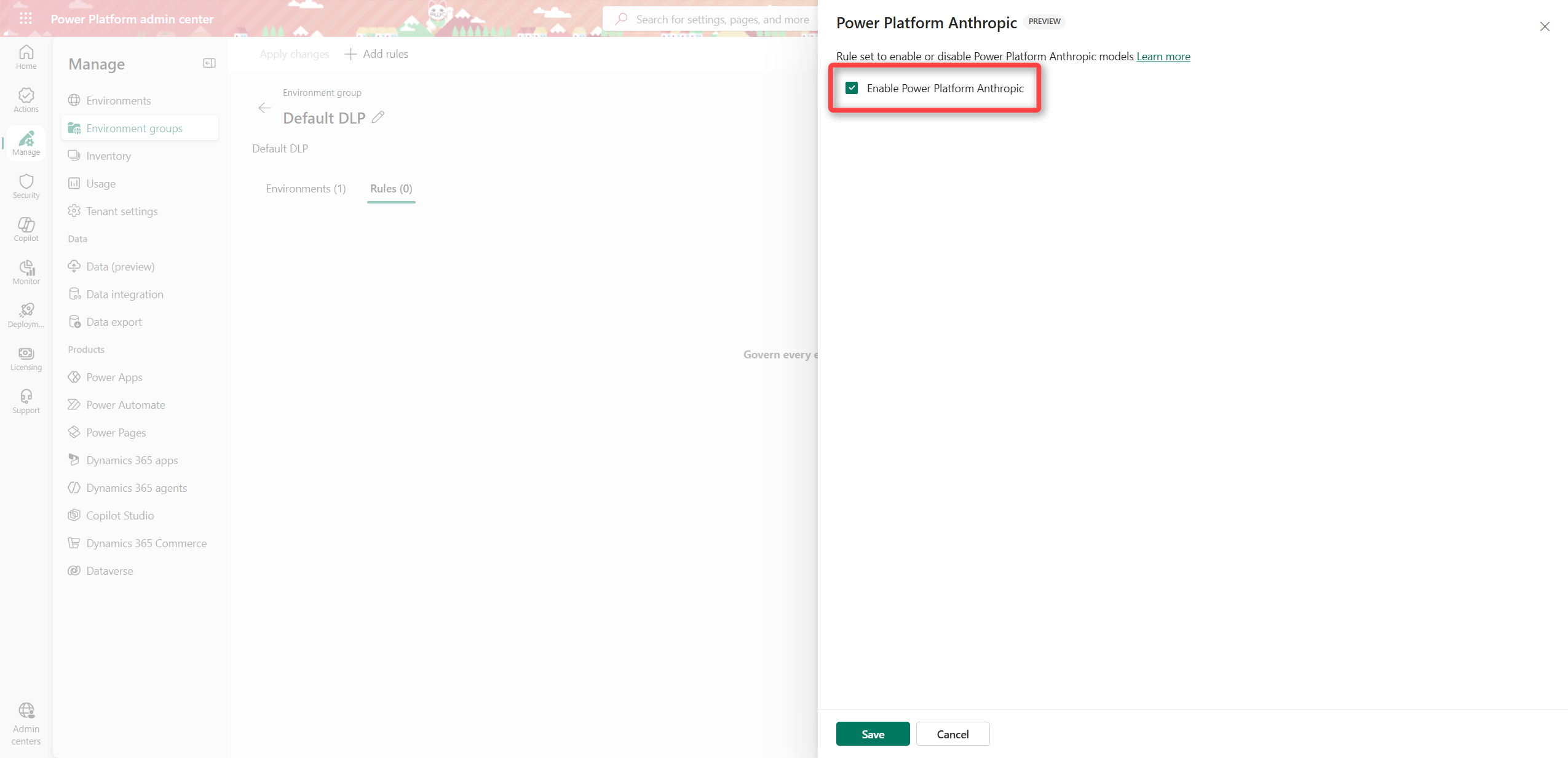
- Power Platform admin center. A Power Platform admin allows Anthropic per environment (Settings > Product > Features) or per environment group with the rule Power Platform Anthropic. The environments in the group must be managed environments. The rule only shows up after Anthropic is enabled in the Microsoft 365 admin center, which can take a few hours. Apply the changes to publish the rule to the group. The rule is labelled preview, and its checkbox is on by default. An admin who adds the rule and applies it without opening it turns Anthropic on for the whole group.
Three consequences:
- A maker in Copilot Studio gets Claude only if the user is inside the Microsoft 365 scope and the environment has the Anthropic setting on. An environment group cannot give Claude to a user the Microsoft 365 scope leaves out.
- An environment group cannot turn Claude off in Cowork or in Word, Excel and PowerPoint. Only the user scope controls those.
- On 9 December the Microsoft 365 gate opens for tenants that moved to All users. An environment group that already has the Anthropic rule on then gives Claude to every user in it. An admin who wants to hold Claude back keeps the rule off, or selects No users or Specific users and groups before then.
Microsoft documentation does not point out whether Copilot Studio Apps respects the environment group rule when it builds a managed app.
Until Claude is inside the boundary, the AI build paths in an EU tenant work like this:
- A business user in Cowork in an EU Data Boundary tenant builds with GPT. Microsoft says “only GPT models are supported” there.
- A user in Copilot Code picks a model or lets Copilot Code choose. The list holds Claude and GPT models, so the Anthropic setting decides whether Claude shows up.
- A maker builds in Copilot Studio. The published app is stored in the environment’s geography. The app-building data follows the maker’s profile, not the environment. Copilot Studio checks the preferred data location first, then Entra Country, then the tenant country. A maker with
USas Entra Country sends that data outside the EU, even in an EU environment. Microsoft does not say which model Copilot Studio uses to build an app. For agents, the Copilot Studio model table lists Claude as cross-geo in Europe and Grok as not available there.
GPT already runs inside the boundary today. OpenAI is a Microsoft subprocessor, and the setting in the Microsoft 365 admin center is on by default (in my tenant too). Two exceptions remain: flex routing at peak load, and a pseudonymised user ID or session ID that may be stored in the US. “Model diverse” means GPT for an EU tenant until Claude is inside.
What I found in my own tenant
I checked the three conditions in the Recursion tenant on 18 November.
- The Anthropic setting is on “All users for Microsoft 365 apps only”. That is the option Microsoft moves to All users on 9 December. My tenant flips, and Claude is then allowed in every Copilot and generative AI experience, not only in Word, Excel and PowerPoint.
- Flex routing is off in both admin centers.
- My default environment has Move data across regions and Bing Search switched on. Both are ways out of the boundary of their own. I also have a developer environment called Preview in the United States region. My own tenant fails the third condition.
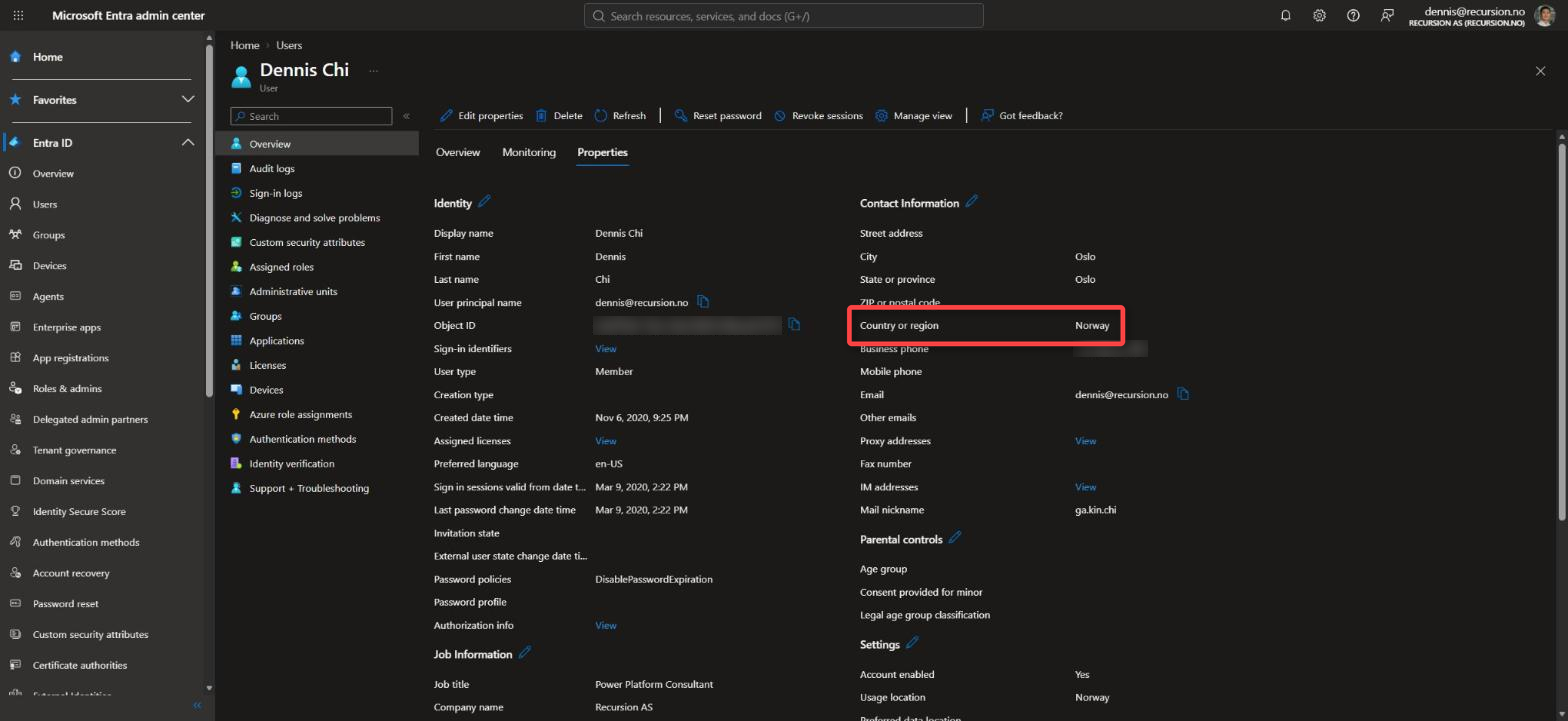
- My Entra Country or region says “Norway”, written out. Copilot Studio ignores a spelled-out name and uses the tenant country. Here that ends in Norway, but only by luck.
- Apps overview and App settings in the Microsoft 365 admin center still carry a PREVIEW label and point to the Supplemental Terms of Use, the day after the GA announcement.
My advice for EU customers now
- Build with the ms CLI and a coding agent your organisation has approved.
- Limit who can create apps with a group-scoped tenant setting and environment groups, as in ways to limit app creation.
- Keep Allow Backend as a Service (Fabric) for Copilot Managed Runtime off until the data protection impact assessment (DPIA) covers who can see the data.
- Check the Anthropic subprocessor setting before 9 December, and the Power Platform Anthropic rule on every environment group. Also check the Entra Country value on every maker who builds in Copilot Studio.
- Check flex routing in both admin centers. In the Power Platform admin center, also check Move data across regions and Bing Search on every environment. Each one is a separate way out of the boundary.
- Put a review date in the DPIA for after Claude is inside the boundary, as in the current state of the EU Data Boundary.
The Fabric integration, the msagent CLI and Code Agents are previews. Their behaviour can change.
Still finding these options a bit confusing?… Drop a comment or find me on LinkedIn.
Sources
- https://techcommunity.microsoft.com/blog/copilot-managed-runtime-blog/copilot-managed-runtime-is-now-generally-available-with-additional-new-preview-f/4571846
- https://learn.microsoft.com/microsoft-365/copilot-managed-runtime/overview
- https://learn.microsoft.com/microsoft-365/admin/manage/apps/licensing-credits
- https://learn.microsoft.com/microsoft-365/admin/manage/apps/licensing-faq
- https://go.microsoft.com/fwlink/?linkid=2368800
- https://learn.microsoft.com/microsoft-365/copilot-managed-runtime/backend-integration/fabric-integration
- https://learn.microsoft.com/microsoft-365/copilot-managed-runtime/developer/apps/
- https://learn.microsoft.com/microsoft-365/copilot-managed-runtime/developer/agents/cli/
- https://learn.microsoft.com/copilot/implement/connect-to-ai-subprocessor
- https://learn.microsoft.com/copilot/implement/copilot-ai-provider-user-sec-group-access
- https://learn.microsoft.com/power-platform/admin/allow-llm-generative-responses
- https://learn.microsoft.com/copilot/implement/copilot-anthropic-apps
- https://learn.microsoft.com/privacy/eudb/eu-data-boundary-transfers-for-all-services
- https://learn.microsoft.com/copilot/cowork/cowork-models
- https://learn.microsoft.com/microsoft-copilot-studio/geo-data-residency-build-apps
Leave a Reply