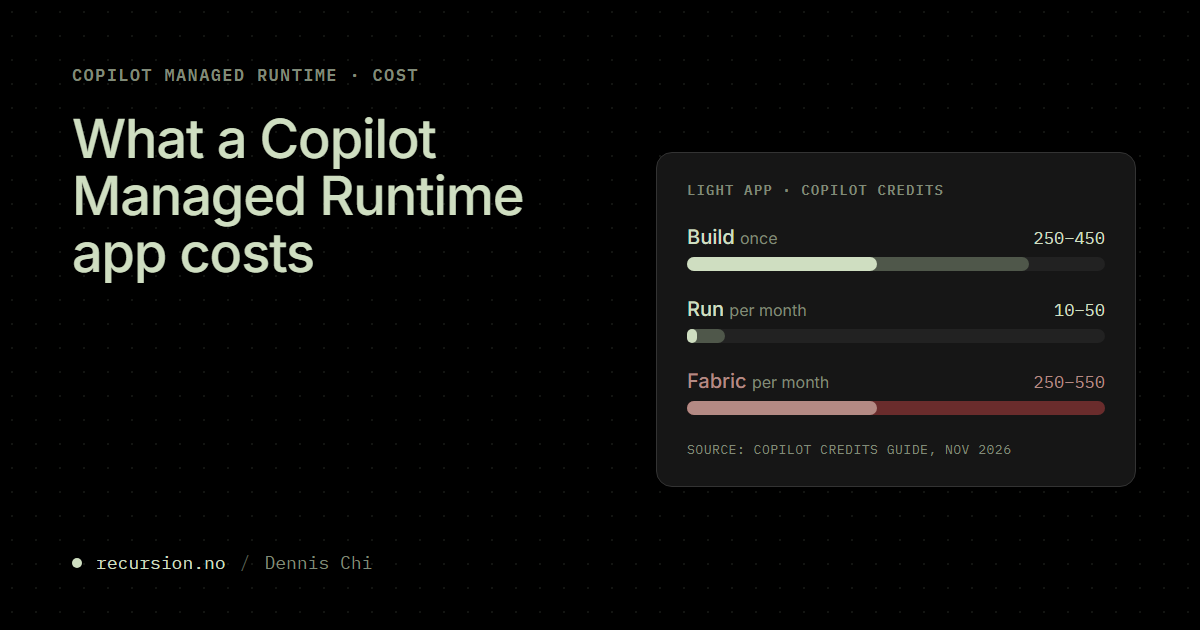
Microsoft has now published enough numbers to put a budget on Copilot Managed Runtime, which is also called Managed Apps. The licensing page in Microsoft docs has the rate and worked examples for running an app. Microsoft’s Copilot Credits Guide from November estimates what it costs to build an app and to add the new Fabric backend. For a small app in the guide, building it once costs more than running it for a month, and the Fabric backend costs about as much every month as the build did. After a year the database is most of the bill.
The order changes with the number of users. The Microsoft docs example of a team tracker for 25 users costs more to run in a month than the guide’s estimate for building a light or medium app. Every figure below is a planning estimate from Microsoft, and the guide prints “rough planning estimates” under every table.
Where the credits go
Every figure in this post is in Copilot Credits. Pay-as-you-go costs US$0.01 per credit, so 100 credits is US$1. Microsoft pools the credits for the whole tenant.
Building an app is billed through the tool the maker used. Running it is billed per user through the Copilot Managed Runtime service in the Microsoft 365 admin center (MAC), whichever tool the maker used. The Fabric backend is billed by the compute its database uses. An app built in Copilot Studio shows the split best: the environment’s Copilot Studio credits pay for building it and do not pay for anyone running it.
Building an app
According to Microsoft docs, building is the most credit-intensive step in the life of an app, so an admin sizes build limits separately from runtime limits. Who pays depends on where the app is built:
- A business user in Cowork needs a Microsoft Copilot license. The building is billed in credits through a Cowork spending policy in MAC, because the license does not include Cowork usage.
- A user in Copilot Code needs the same license and a spending policy that includes Copilot Code.
- A maker in Copilot Studio uses the Copilot Studio credits of the environment. Microsoft is moving Copilot Studio cost management into MAC, so the admin sets those credits in the Power Platform admin center (PPAC) or in MAC depending on the environment.
- A developer with the ms CLI needs no license to create, build or deploy an app. The coding agent the developer works with has its own price.
The guide gives the same build estimate for Cowork and Copilot Studio. It depends on the model, the app and how many rounds the maker needs:
- Light app: about 250 to 450 credits (US$2.50 to 4.50). The guide’s example is a workshop hub with a schedule, session materials, a feedback form and an admin page.
- Medium app: about 400 to 750 credits (US$4 to 7.50).
- Heavy app: about 700 to 1,350 credits or more (US$7 to 13.50 and up).
Copilot Code is estimated per task instead, from 25 to 60 credits (US$0.25 to 0.60) for a light task to more than 200 (US$2) for a heavy one.
Running an app
Every user who runs an app needs Power Apps Premium or a place in a spending policy that selects the Copilot Managed Runtime service. That includes a developer who runs the app locally with the ms CLI. A user can have both. Premium is then used first, and credits pay only for what Premium does not cover (Work IQ APIs and usage above the daily Power Platform request limits). Power Apps use rights in Microsoft 365 E3/E5 and Dynamics 365 do not cover a managed app, and a Microsoft 365 Copilot license on its own does not cover it either.
The rate is 0.1 credits (US$0.001) per API call. Each script, style sheet or image the app loads at launch counts as a call, and so does each connector call, each Dataverse call and each publish. A credit pays for 10 calls, so US$1 pays for 1,000.
The licensing page in Microsoft docs has worked examples over 22 working days a month. The low figure counts one call per launch and the high figure counts ten:
- A personal app with 1 user, 3 launches a day and 5 data calls each: 39.6 to 99 credits a month (US$0.40 to 0.99).
- A team tracker with 25 users, 2 launches a day and 10 data calls each: 1,210 to 2,200 credits (US$12.10 to 22).
- A department request app with 300 users, 1 launch a day and 8 data calls each: 5,940 to 11,880 credits (US$59.40 to 118.80).
For the team tracker, a user makes 2 × (1 + 10) = 22 calls a day, which is 484 calls over 22 days. At 0.1 credits per call that is 48.4 credits (US$0.48) per user, and 1,210 credits (US$12.10) for all 25 users.
Microsoft’s Copilot Credits Guide estimates running per app instead of per user, in light, medium and heavy profiles:
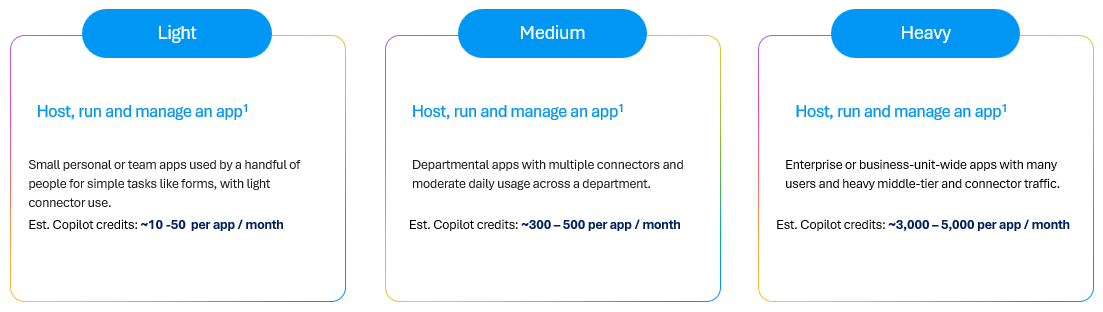
The guide’s figures are much lower than the examples in Microsoft docs. The personal app there for one user uses 39.6 to 99 credits (US$0.40 to 0.99) a month, which is at or above the guide’s whole light range for “a handful of people”. Neither source says how many users or calls the guide’s figures assume, so I plan with the examples in Microsoft docs because they show the arithmetic. The guide’s figures also leave out the request limits that come with Power Apps Premium.
With more users the order from the introduction turns. A month of the 25-user team tracker costs 1,210 to 2,200 credits (US$12.10 to 22), which is more than building a light or a medium app. The guide shows the same for its heavy profile, at 3,000 to 5,000 credits (US$30 to 50) a month to run against 700 to 1,350 (US$7 to 13.50) to build.
The Fabric backend
The Fabric backend is a public preview that gives a managed app a database in Fabric. Microsoft bills it by compute at 0.005 credits per second, which is 18 credits (US$0.18) for every hour the database is active (0.005 × 3,600). Nobody has to buy Fabric capacity. Setting it up needs a Fabric license (Power BI Premium Per User, Power BI Pro or Fabric Free) as well as usage-based billing.
The product team informed that the backend does not use the Fabric capacity a tenant already has, so it does not compete with Power BI or other Fabric workloads. And the free Fabric license is enough, so a user without Power BI Pro or Premium Per User does not need a paid license for it.
The guide estimates a month of Fabric from the hours a day the database is active. That comes to US$2.50 to 5.50 a month for a light app, US$16.50 to 21.50 for a medium app and US$47 to 56 for a heavy app.
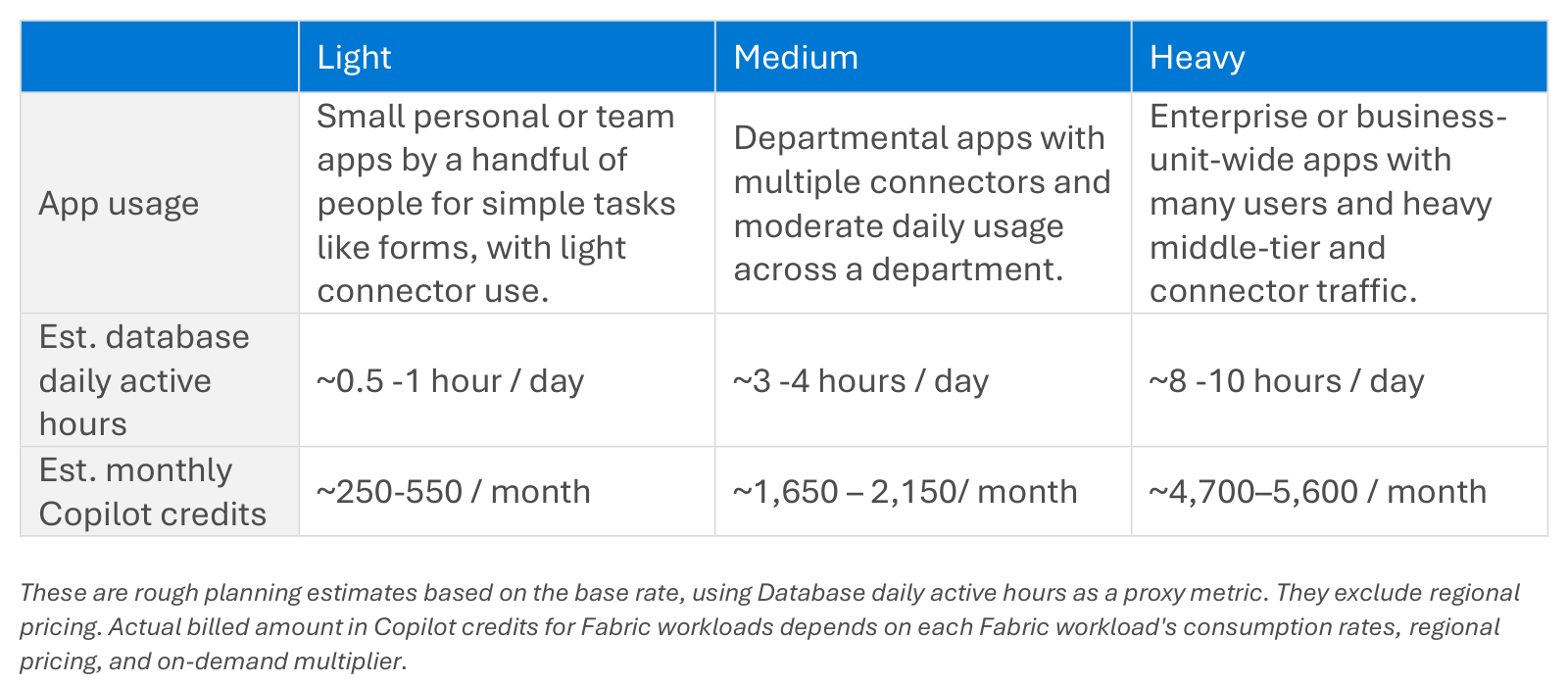
These figures use the base rate. They leave out regional pricing and the on-demand multiplier, so the price in a Norwegian or EU region is not in the guide.
Put together for a light app, the guide’s figures give this first year:
| Meter | Credits | US$ |
|---|---|---|
| Building, once | 250 to 450 | 2.50 to 4.50 |
| Running, 12 × 10 to 50 | 120 to 600 | 1.20 to 6 |
| Fabric backend, 12 × 250 to 550 | 3,000 to 6,600 | 30 to 66 |
The Fabric backend comes to between 86 and 89 percent of that year. With the personal app from Microsoft docs instead of the guide’s runtime figure (12 × 39.6 to 99 credits = 475 to 1,188 credits, or US$4.75 to 11.88), the order stays the same. Sharing the app also shares the data in Fabric with the same users, which I covered in the GA post.
Sizing a first spending policy
Microsoft recommends a broad policy for all users first, and I would start there. The steps in MAC:
- Go to Copilot > Cost management and select Get started to turn on usage-based billing. Pick the billing method. Prepaid capacity packs are used first, then a Copilot Credit Pre-Purchase Plan (P3), then pay-as-you-go. Turn on a pay-as-you-go meter as well, or users are blocked once the prepaid credits run out.
- Under Configuration, select + Add spending policy. Keep All users as the scope, select Copilot Managed Runtime and set 100 credits (US$1) per user per month. That is 1,000 calls a month, or about 45 calls per working day.
- Add a policy for each security group that will use apps heavily, for example 1,000 credits (US$10) per user. A user in two policies gets the one with the highest per-user limit.
- Set alerts on each policy, and tell makers that the people they share an app with need coverage of their own.
- Give makers a build budget of their own: a spending policy that selects Copilot Cowork for business users in Cowork, and Copilot Studio credits on the environment for makers in Copilot Studio.
Microsoft docs call spending policies “limits, not purchases”. A broad policy for 400 users has a ceiling of 40,000 credits (US$400) a month, and the bill is what the users consume.
A user who reaches the limit does not fall back to another policy. The user selects Request more in the app, and an admin approves the request in Cost management. Moving a user to another group in the middle of the month does not reset what the user has consumed. All limits reset on the first of the month.
A policy that only selects Cowork does not cover running apps. A user without coverage gets a warning and is blocked after 20 app operations or five minutes, which Microsoft docs still describe as preview behaviour.
The smallest P3 tier is 300,000 credits (US$3,000 at list price, US$2,850 after the 5 percent discount), and unused credits expire after a year. A first team app comes nowhere near that, so I would start on pay-as-you-go and look at the real consumption after the first month.
Caveats
- The Copilot Credits Guide figures are Microsoft’s planning estimates, not guarantees.
- The runtime estimates leave out the Power Apps Premium request limits.
- The Fabric estimates leave out regional pricing and the on-demand multiplier.
- The Fabric backend is a preview, and its behaviour and price can change.
What per-user limit did you give your first runtime policy, and has anyone in your tenant hit it yet? Drop a comment or find me on LinkedIn.
Where to go next
- Copilot Managed Runtime is generally available: what an EU admin checks first
- Manage licensing and Copilot Credits for apps on Copilot Managed Runtime (Microsoft docs)
Leave a Reply